Home › Blog ›
What Your Password Manager Knows About You
Privacy Analysis
🔍 What Your Password Manager Knows About You
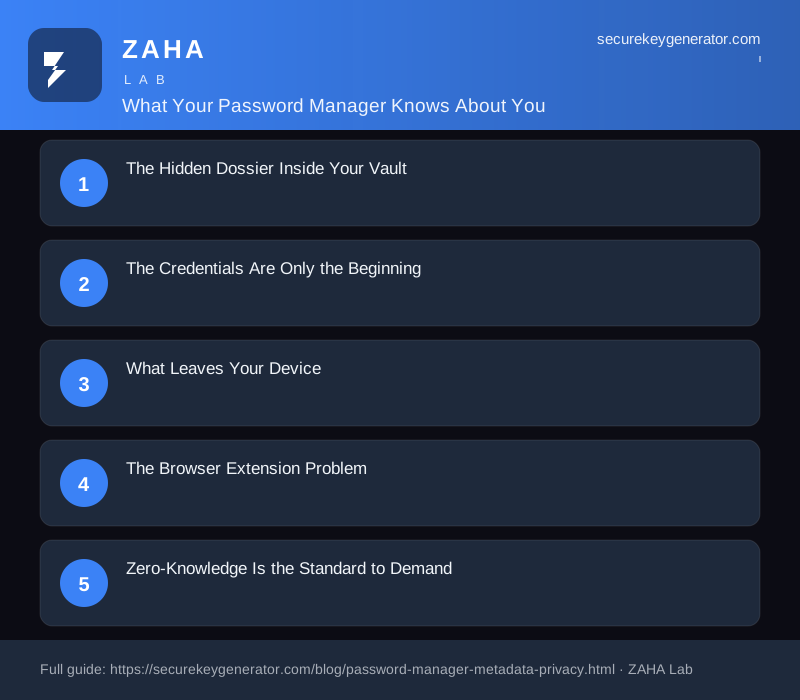
What Your Password Manager Knows About You, key points at a glance
By Dr. Sarah Chen, · 16 Apr 2026 · 3 min read · 0 words
Your password manager knows more than just your passwords. It knows which websites you visit, when you log in, how often you change credentials, and potentially the device and network you use. This metadata, while not as sensitive as your actual passwords, still paints a detailed picture of your digital habits and can be valuable to advertisers, law enforcement, or attackers.
Choosing a password manager with a strong privacy policy and minimal data collection is critical. Bitwarden is open-source, independently audited, and collects only the minimal data needed for account functionality with no tracking, analytics, or metadata logging. For users seeking an even more privacy-focused approach, 1Password operates on a zero-knowledge architecture where your vault data is encrypted before it ever reaches their servers.
When you install a password manager, you hand it the keys to your entire digital life. That is the whole point: one secure vault to hold the credentials you can no longer memorize. But few people stop to ask what the application itself learns about them in the process. A password manager is not just a passive lockbox. It observes patterns, stores metadata, and in many cases transmits information back to the company that built it. Understanding exactly what your manager knows is the first step toward deciding whether you trust it with that knowledge.
The Credentials Are Only the Beginning
The obvious thing your password manager holds is your list of usernames and passwords. In a well-designed tool these are encrypted with a key derived from your master password, so the company cannot read them. But the entries themselves reveal a remarkable amount about you even when the secret values stay sealed:
Every website you have an account on. The URLs saved in your vault map out your banking relationships, your medical portals, your dating profiles, your political affiliations, and your shopping habits.
When you created and last used each login. Timestamps reveal which services you actively rely on and which you have abandoned.
Your email addresses and usernames. These tie disparate accounts back to a single identity and are often stored in a form the provider can index.
Secure notes and identity records. Passport numbers, credit cards, software licenses, and Wi-Fi passwords frequently end up in the same vault.
Even if the password strings are encrypted, this surrounding context, often called metadata, can be enormously revealing. A list of which sites you use is a portrait of who you are.
What Leaves Your Device
Cloud-based password managers sync your vault across devices, which means data travels to and from the provider's servers. The encrypted blob is one thing, but several pieces of operational data often move in the clear or in a form the company can read:
Your account email and billing information.
The IP addresses and approximate locations you log in from.
Device identifiers, operating systems, and browser versions.
Telemetry about how often you open the app and which features you use.
This is the same category of information that ordinary web services collect, but it sits alongside the most sensitive store you own. A breach of a provider's servers, and several major password managers have suffered them, can expose not just encrypted vaults but the metadata describing whose vaults they are.
The Browser Extension Problem
Most people interact with their password manager through a browser extension. To autofill credentials, that extension must be able to read the contents of the pages you visit and detect login forms. This gives the extension a privileged view of your browsing in real time. A poorly written or compromised extension can become a surveillance tool, observing every form you touch. Reputable managers limit what they capture and process it locally, but the architectural reality is that an autofill engine sees a great deal.
Zero-Knowledge Is the Standard to Demand
The defense against most of these concerns is a zero-knowledge architecture. In this model, encryption and decryption happen entirely on your device, and the master password never reaches the provider. The company stores only an opaque blob it cannot open. When evaluating a manager, look for:
Clear documentation that encryption keys are derived and used client-side only.
A transparent privacy policy describing exactly what metadata is collected.
Taking Back Control
You are not powerless over what your password manager knows. Review the privacy settings and disable optional telemetry where you can. Prune old entries so your vault reflects only what you actually use. Consider a local-only or self-hosted option if you would rather no metadata leave your control at all. Most importantly, choose a generator and manager that prove their privacy claims rather than merely asserting them. The right tool protects you not only from outside attackers but from unnecessary exposure to the company itself, knowing as little about you as possible by design.
We use cookies to improve your experience. Learn more
Keep your credentials secure with NordPass, a password manager built for security and ease of use.
The Metadata Trail Behind Every Login
Your password manager does more than store credentials. Every time you autofill a login, it records a timestamp, the website domain, and often the device you used. Over months, this builds a surprisingly detailed map of your digital life, which banks you use, which dating apps you've signed up for, and which subscriptions you've quietly abandoned. This metadata exists even when the passwords themselves stay encrypted.
What It Can Infer About Your Habits
The pattern of your activity reveals more than the data itself. Consider what a vault's access logs can suggest:
Your daily routine: Frequent 7 a.m. logins to a corporate portal pinpoint your work schedule and likely time zone.
Financial relationships: Stored entries for three different brokerages and a crypto exchange hint at your investing behavior.
Health concerns: Credentials for a specific pharmacy or telehealth service can imply sensitive medical context.
Life changes: A sudden cluster of new accounts for moving companies, utilities, and schools may signal a relocation.
The Categories of Data Stored
Most users assume their manager only holds passwords. In reality, modern vaults often retain payment card numbers, secure notes containing passport details, Wi-Fi keys, software licenses, and two-factor recovery codes. Some sync this across devices, meaning copies live on your phone, laptop, browser extension, and the provider's cloud simultaneously. Each location is a potential exposure point.
Protecting Yourself Without Paranoia
You don't need to abandon the tool, you need to use it deliberately. Take these practical steps:
Enable zero-knowledge encryption so the provider cannot read your vault contents.
Review and purge stale entries every few months to shrink your exposure.
Turn off telemetry and usage analytics in the settings where available.
Use a strong, unique master password and hardware-based two-factor authentication.
Awareness, not avoidance, is the goal. Knowing what your manager records lets you make informed choices about the convenience-versus-privacy trade-off you accept every day.